Last Updated
TL;DR Don’t worry, nothing to see here. Go directly to Camsoda.com mobile.
It isn’t every day I get a “harmful app” warning from Google, in fact this was the first one I’ve ever seen!
When I opened my phone I saw this notification from “Google Play Protect” that I’d never heard of before, warning me that there was a harmful app and prompting me to uninstall it.
The notification said :
Uninstall harmful app
Camsoda was disabled because it puts your device at risk
Notification from Google Play Protect

The notification says the app has been disabled.
I was shocked!
Mostly because I didn’t remember ever installing a Camsoda app. I didn’t know they had one.
Although I do install a lot of camming-related apps on my phone, Camsoda wasn’t on my list of camsites with mobile apps.
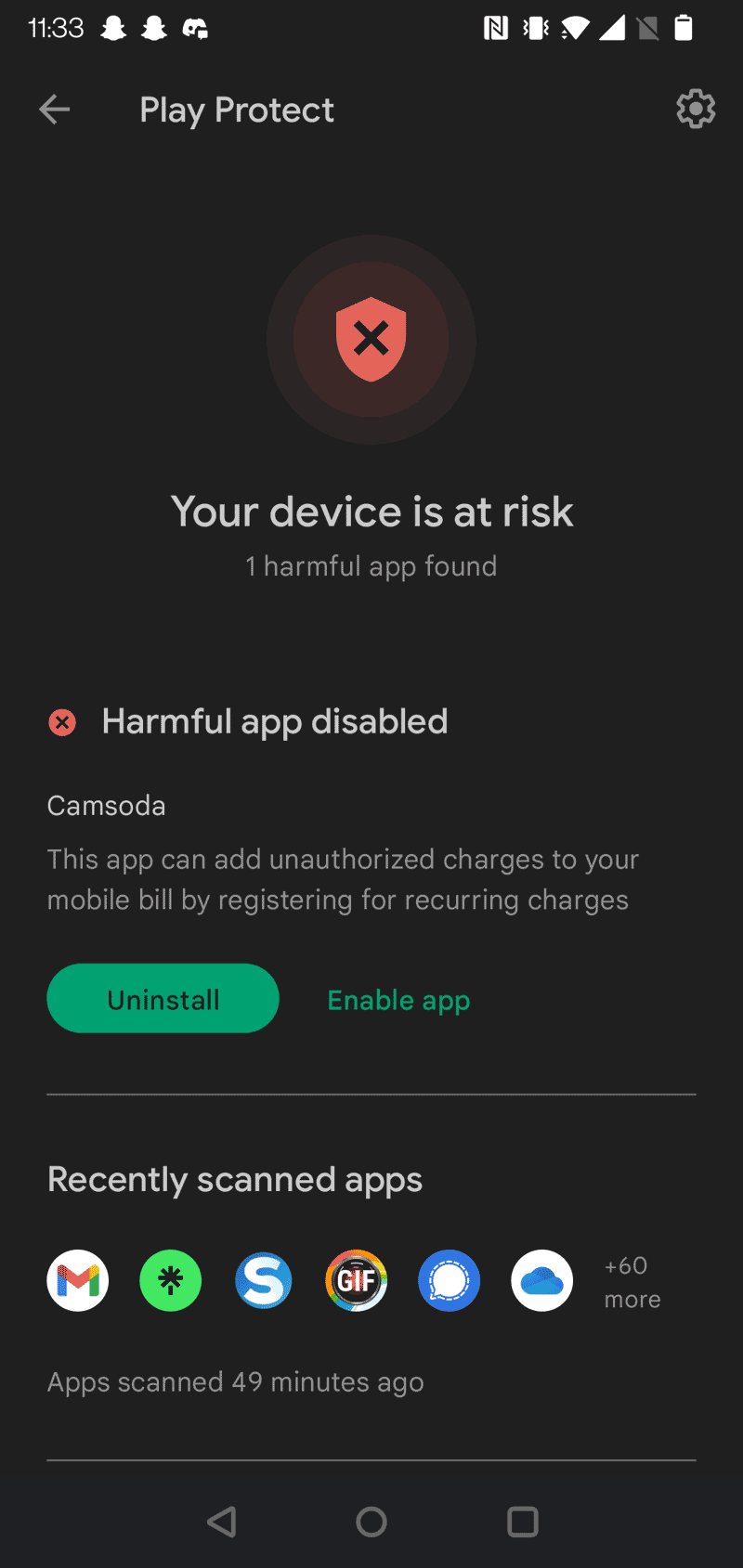
When I tapped the notification it gave me a bit more details about the problem:
Your device is at risk
1 harmful app found
Harmful app disabled
Camsoda
This app can add unauthorized charges to your mobile bill be registering for recurring charges
The Play Protect warning details
And then a big green “Uninstall” button and a much smaller Enable app choice.
Not being a complete idiot I went with the Uninstall button and, just like it said it would, the app was uninstalled and gone.
That left me with a strange feeling.
Was it really a Camsoda app that was harmful and set up mobile bill charging?
There are some camsites that let you buy time with their girls by adding the fees to your mobile phone bill, that’s particularly popular in Europe and the UK at sites like Babestation, VisitX and the recently checked Xpanded.
But while some global sites like Bongacams do support phone billing, at least in some countries, Camsoda isn’t one of them.
What was going on then?
I couldn’t search the Google Play Store for more about this “Camsoda app” because it appears to have been deleted.
On the other hand, a regular Google searched turned up this entry which may have explained things.
When I google for camsoda app I get this result:

And clicking through goes to a play store URL, but one that is deleted and empty.
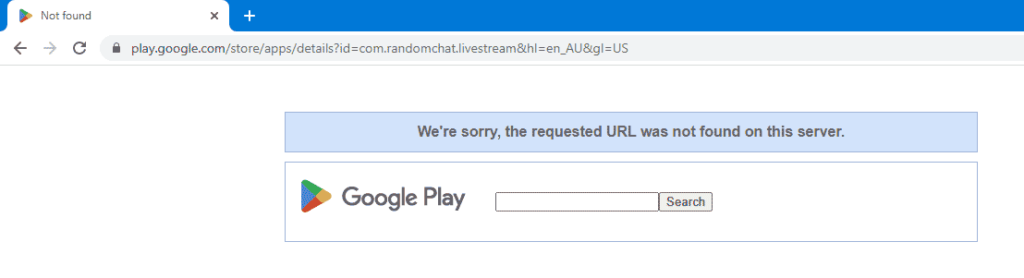
The clue to what happened here is in the URL.
I’m not sure whether you are familiar with Android App development, but even if you are not you can see the id field in this URL:
id=com.randomchat.livestream
The Android app ID fields are an arbitrary string, but to avoid collisions you are supposed to use your site domain name, but with the parts in reverse. For example, if I had an app for this domain www.adult-webcam-faq.com I should make my app id be com.adult-webcam-faq.com.www.
That means this app belongs, or should belong, to a website called livestream.randomchat.com.
Only that doesn’t exist.
There is a randomchat.com, but it doesn’t have a livestream subdomain.
Rather that whole thing is some kind of live random chat site, as it says in the name, which doesn’t make much sense and which I need to investigate more. But that’s for another time, it clearly isn’t related to Camsoda.com.
My conclusion is that this “camsoda app” that was flagged by Google Play Protect is another one of those fake apps that masquerad as a well-known camsites in order to get installs, and which then sign people up for other fee-paying phone services.
It is a lot like the case with the fake cam4 app that I warned about just a few months ago, though that one seemed worse as it may have been a login-stealing app.
In this case, the “Camsoda app” that was disabled by Google Play Protect was simply a fake app pretending to be from Camsoda.
How should you ensure that you are installing only real apps from Camsites? The best way is to start at the site itself and follow links from there.
At the same time that doesn’t cover everything, for example, the new LoyalFans content and live streaming site, which is great and I’m enjoying using, has an app but doesn’t have it in the Google Playstore so it isn’t “official”.
Watch out also for a lot of websites that these days call themselves “apps”, but are actually just websites that are sized correctly to work on your phone. MyFreeCams App is the biggest example of this. It does work great on a phone, but it isn’t an “App” in any way or form which confuses the use of the word.
While I’m glad that Google Play Protect did what it was supposed to do, by protecting my playing, it is a bit worrying that this app managed to be around for long enough for me to install it, and then forget about it.
If you want to access Camsoda on your phone then the best way is simply to visit it on your phone using any modern web browser, Safari on iPhone or Chrome on Android, and use the mobile version of Camsoda.

Let me know in the comments if you have come across this or other fake camsite apps, we should report them and get the banned promptly to protect people.
How to cite this post
APA:
Hony Tsoi (2022). Is Camsoda a harmful app? Why was it disabled by Google?. Adult Webcam FAQ. Retrieved from https://www.adult-webcam-faq.com/2022/10/17/is-camsoda-a-harmful-app-why-was-it-disabled-by-google/
MLA:
Hony Tsoi. "Is Camsoda a harmful app? Why was it disabled by Google?." Adult Webcam FAQ, 2022, https://www.adult-webcam-faq.com/2022/10/17/is-camsoda-a-harmful-app-why-was-it-disabled-by-google/.
Chicago:
Hony Tsoi. "Is Camsoda a harmful app? Why was it disabled by Google?." Adult Webcam FAQ. Last modified 2022-10-17. https://www.adult-webcam-faq.com/2022/10/17/is-camsoda-a-harmful-app-why-was-it-disabled-by-google/.
BibTeX (@misc):
@misc{Tsoi_2022,
  title={Is Camsoda a harmful app? Why was it disabled by Google?},
  url={https://www.adult-webcam-faq.com/2022/10/17/is-camsoda-a-harmful-app-why-was-it-disabled-by-google/},
  publisher={Adult Webcam FAQ},
  author={Hony Tsoi},
  year={2022},
  month={Oct.}
}



They absolutely can see you. Why are you lying about it?
Yea... it is happening and I've been asked or told things by hosts/models that were in rooms with no devices…
It will never be the same! I loved plexstorm!
oh man ... i looooove Plexstorm back in the days! Sadly it was only a betatest site from switzerland i…
And like what if pigs could fly.