
Last Updated
Question: How to Add models as Favorites on LiveJasmin? 💛 ?
Answer:
Adding a favorite on LiveJasmin is more than just good manners, it helps you to organize and keep track of models who you have found that interest you.
One of the biggest problems of all cam sites such as LiveJasmin.com is that there are just so many great models out there it can be hard to know who to focus on. Combine that with the fact that they are not always available when you want to see them and the problem of keeping track really becomes one that needs some tools.
As each model has their own page on the cam site you could just add them to your browser favorites, but not everybody really wants to have their browser full of cam girl web pages, besides most browser make it hard to find your favorites and start popping up unwanted suggestions when you are looking for something else.
That is why LiveJasmin provides a way to keep track of your favorites within their own website. It not only lets you find your favorite cam models all in one place, but it also helps LiveJasmin know what kind of model you find interesting, and hence they can recommend other models when your favorites are not available.
Marking a LiveJasmin cam girl as a favorite within LiveJasmin itself also means that the model knows you find her special, and although she may have many fans there is a good boost for her when she gains more. Every fan counts. Both the model herself and those at her studio and at LiveJasmin.com itself can see how many fans she has, and that are all good indicators that she is doing well.
Now to make a cam girl at LiveJasmin as a favorite you need to have some sort of account, even the most basic free account is fine. If you haven’t done so already then read the instructions on how to make a free account at LiveJasmin then come back here.
You can add a model as a favorite even when you are in the thumbnail view before you enter her room, if you are browsing through models looking for the right one and just want to make them right now then go ahead.
Move your mouse over the thumbnail picture of the model, after a moment it will start to show her live video, but you don’t have to wait for that. Point to the bottom right corner and a little heart icon appears. At first, the heart is white, but if you click on it then it turns yellow.
Add Favorites at LiveJasmin for Free
Watch the animation to see how it works. It doesn’t cost anything to make models Favorites. This is a free feature of LIveJasmin.

Don’t worry about marking them by accident. If you click one by mistake and want to remove the heart mark for that model then just click again and it is removed.
You do have to see the sad broken heart animation though.
It looks like this:

When you are inside a chat room then the button for favorites is on the top left of the video window.
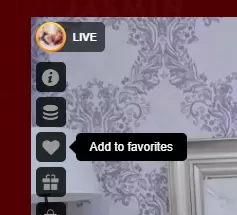
It doesn’t appear until you point to it with your mouse though. Just wave your mouse in the top left area of the video and the button appears.
The process for removing a favorite is the same as for adding it. Click on it again when it has gone yellow and it will break and go back to white.
Yellow hearts 💛 mean that the model is now in your favorites.
The next time you visit LiveJasmin you’ll notice that you can easily find your favorites by clicking on the heart at the top right of the screen.
When you want to see all your favorite models at LiveJasmin you just have to hit the heart icon at the top menu of the screen. That takes you to your private favorite page where you see the models you have selected as favorites.

Livejasmin Favorites on Mobile
When using LiveJasmin on a mobile phone the idea is all the same, but the location of the buttons is different.
Marking models a fav can’t be done until you go into a chat room, and then the heart icon is hidden behind the “…” three-dot menu button on the right. Press the three dots, and then when the heart appears, tap the heart. Now you have used your mobile to mark a model at LiveJasmin as a favorite.

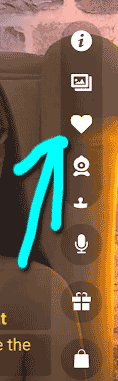
Once you have marked models as favorites, regardless of whether you did it on your PC or on your mobile, then you can see those same ones on both devices.
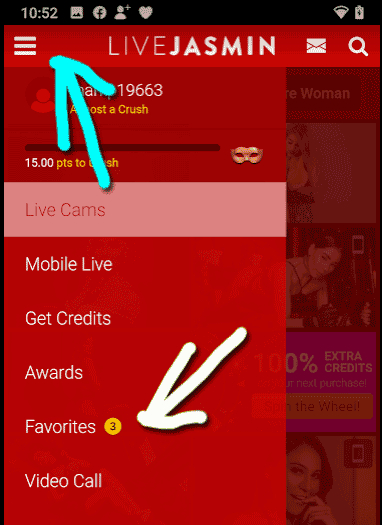
Just click the three dashes hamburger button 🍔and then choose Favorites.
How to cite this post
APA:
Hony Tsoi (2021). [ANSWERED] How to Add Favorites on LiveJasmin?. Adult Webcam FAQ. Retrieved from https://www.adult-webcam-faq.com/question/how-to-add-favorites-on-livejasmin/
MLA:
Hony Tsoi. "[ANSWERED] How to Add Favorites on LiveJasmin?." Adult Webcam FAQ, 2021, https://www.adult-webcam-faq.com/question/how-to-add-favorites-on-livejasmin/.
Chicago:
Hony Tsoi. "[ANSWERED] How to Add Favorites on LiveJasmin?." Adult Webcam FAQ. Last modified 2021-03-19. https://www.adult-webcam-faq.com/question/how-to-add-favorites-on-livejasmin/.
BibTeX (@misc):
@misc{Tsoi_2021,
  title={[ANSWERED] How to Add Favorites on LiveJasmin?},
  url={https://www.adult-webcam-faq.com/question/how-to-add-favorites-on-livejasmin/},
  publisher={Adult Webcam FAQ},
  author={Hony Tsoi},
  year={2021},
  month={Mar.}
}

![[ANSWERED] Can Streamate Models See you?](https://www.adult-webcam-faq.com/wp-content/uploads/streamate-create-free-account-440x264.webp)
![[ANSWERED] Is there a Chaturbate Mobile App?](https://www.adult-webcam-faq.com/wp-content/uploads/chaturbate-mobile-viewer-landscape-cam2cam-440x264.jpg)
![[ANSWERED] What Cam Girl Sites Accept PaySafeCard?](https://www.adult-webcam-faq.com/wp-content/uploads/question-1015308_640-440x264.jpg)
They absolutely can see you. Why are you lying about it?
Yea... it is happening and I've been asked or told things by hosts/models that were in rooms with no devices…
It will never be the same! I loved plexstorm!
oh man ... i looooove Plexstorm back in the days! Sadly it was only a betatest site from switzerland i…
And like what if pigs could fly.